Published
clawctl: a kubectl-shaped wrapper for an agent gateway
A four-agent fleet does not need a hundred-agent fleet's rails. It needs the same rails a hundred-agent one would. Here is the wrapper, and why every line of it traces back to a specific failure mode.

I open-sourced the tiny shell wrapper that talks to my openclaw agent fleet, plus the Claude Code plugin that lives in the same repo. One bash file, five non-negotiable rules, and a GitHub loop-back convention.
In the last post I wrote about the boring plumbing of an agent fleet. The plumbing now has a wrapper. It is called clawctl, it lives at github.com/tomstagl/clawctl, and the same repo doubles as a Claude Code plugin. This post is the why, not the what — flag-by-flag walkthroughs live in docs/cli-reference.md.
The fleet is small: four registered agents — default, main, dead-code-sweep, test-coverage-filler — keeping recordsv.lt and a sibling Lambda service tidy on a weekly cadence. Talking to them from my Mac meant juggling bearer tokens, traceparents for observability, regex-redacting leaked secrets, and SSHing for ops commands. With raw curl that works once. Doing it 50 times a day is how secrets end up in shell history.
So I wrote a wrapper.
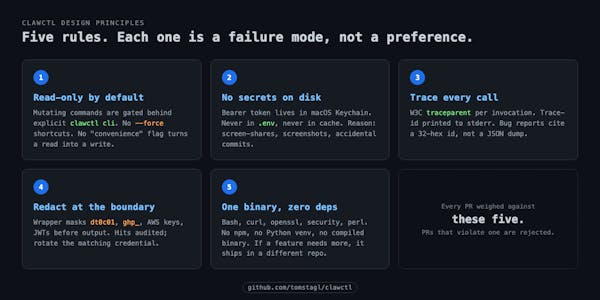
Five failure modes that became five rules
These are not theory. Each one is something I either hit or watched a teammate hit elsewhere.
1. Read-only by default. A --force shortcut on a generic chat client is how an agent ends up cancelling a cron job nobody asked it to cancel. In clawctl everything mutating — adding agents, scheduling cron, installing skills, rotating tokens — sits behind an explicit clawctl cli <subcommand> path. There is no convenience flag that flips a read into a write.
2. No secrets on disk. The bearer token lives in macOS Keychain. The wrapper reads it at call time and never persists it — not in env, not in a config file, not in the cache. The reason is screenshots. I screen-share fairly often. .env files end up on screen by accident. Keychain does not.
3. Trace every call. A W3C traceparent is generated per invocation and printed to stderr. Reporting an issue means quoting trace-id: <32-hex>, not pasting JSON. The inverse, clawctl trace, prints the Jaeger UI link plus the first 30 spans for any trace-id.
4. Redact at the boundary. Even with strict prompts upstream, agents leak. The wrapper masks known patterns — dt0c01.*, dt0s16.*, gh[psoru]_*, AWS access keys, JWTs, the gateway-token literal — before output reaches the terminal. Hits replace the value with <REDACTED:kind:first-11-chars…>, print a stderr warning naming the kind and source agent, and append to ~/.cache/clawctl/last-redaction. A redaction hit means the agent leaked upstream — rotate the matching credential immediately.
5. One binary, zero runtime deps. clawctl is one bash file. Hard dependencies: bash, curl, openssl, security (macOS Keychain), and a POSIX perl. Optional: jq, gh. No npm, no Python venv, no homebrew-only deps beyond what brew bundle would install in a fresh shell. If a feature needs a heavier runtime, it lives in a separate repo.
The five fit on a sticky note. Every PR against this repo gets weighed against them. PRs that violate one are rejected, even when the feature is useful.


The shape of it
The ergonomic story is "kubectl, but for openclaw." A subcommand surface, JSON-first output, exit codes you can actually script against. A few examples that show the shape rather than every flag:
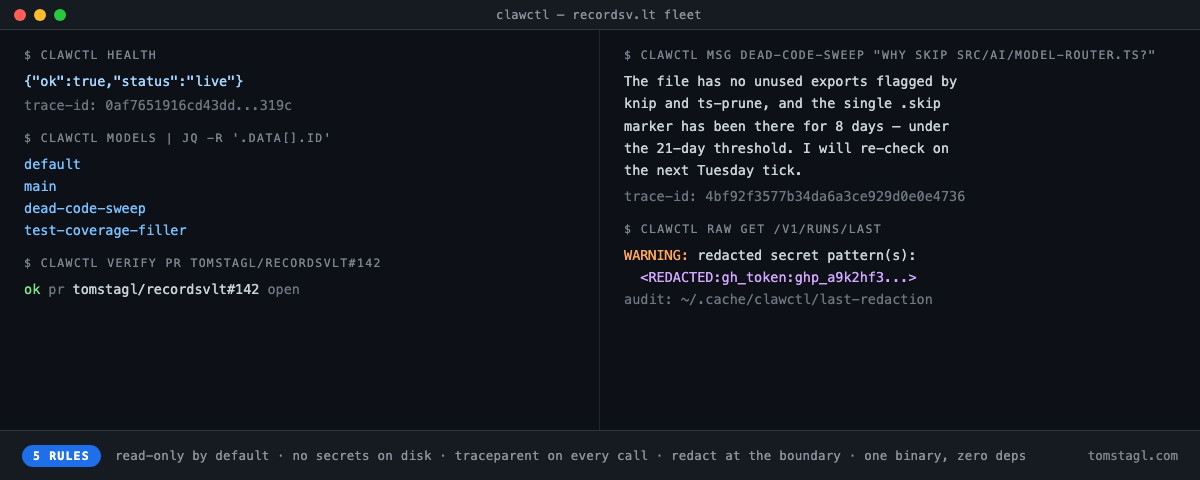
$ clawctl health
{"ok":true,"status":"live"}

$ clawctl models | jq -r '.data[].id'
default
main
dead-code-sweep
test-coverage-filler

$ clawctl msg dead-code-sweep "Why did you skip src/ai/model-router.ts last run?"
The file has no unused exports flagged by knip and ts-prune, and the
single .skip marker has been there for 8 days — under the 21-day
threshold. I will re-check on the next Tuesday tick.
trace-id: 0af7651916cd43dd8448eb211c80319c

$ clawctl verify pr tomstagl/recordsvlt#142
ok  pr  tomstagl/recordsvlt#142  open  openclaw,openclaw:dead-code-sweep

$ clawctl trace 0af7651916cd43dd8448eb211c80319c
ui:    https://jaeger.lan:16686/trace/0af7651916cd43dd8448eb211c80319c
spans: 14
  openclaw-gateway   chat.completions   612ms
  openclaw-runtime   agent.dispatch     598ms
  …
Exit codes are the kubectl convention, mostly: 0 ok, 2 usage, 6 DNS, 7 connection refused, 22 HTTP 4xx/5xx, 28 timeout. A wrapper around clawctl health in a CI job can branch on $? without parsing stdout.
clawctl verify is the one I use most outside debugging. Every issue and PR an agent opens carries citations — commit SHA, owner/repo#num, file path. clawctl verify resolves them in one command. Exit 0 is verified, 1 is "citation does not resolve, do not trust this claim." It is the cheapest possible defence against an agent that hallucinates a file path that almost exists.
The plugin half
The same repo ships a Claude Code plugin. Once clawctl is on PATH, the install is two lines:
/plugin marketplace add tomstagl/clawctl
/plugin install clawctl
What lands:
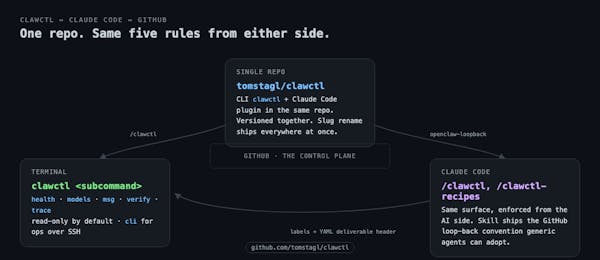
/clawctl— the slash command. Drives the same surface as the CLI: health, models, msg, cli, verify, trace./clawctl-recipes— the recipe pages, ported as a slash command so I do not have to grep my own docs./clawctl-cli— the full openclaw CLI reference for when I need a flag I do not remember.openclaw-loopback— a generic skill for projects whose agents deliver work as labelled GitHub issues and PRs.
The slash commands enforce the same five rules from the Claude side: read-only by default, JSON-first, traceparent on every call, redaction at the boundary, never bypass the wrapper. The point is not "two ways to do the same thing." The point is that the same rails apply whether I am driving from my terminal or letting Claude drive on my behalf.
The openclaw-loopback skill is the convention that makes the loop-back design from the previous post portable. Every issue or PR an openclaw agent opens starts with a fenced YAML deliverable header:
---
agent: <slug>
run-id: <uuid>
traceparent: 00-<32-hex>-<16-hex>-01
started: <ISO 8601 UTC>
ended: <ISO 8601 UTC>
status: DONE | PARTIAL | BLOCKED
---
Plus dual labels: openclaw (catch-all) and openclaw:<slug> (per agent). One repo, one issue tracker, one release flow — the CLI and the plugin version together. If I rename a slug, the change ships everywhere at once. There is no second place to forget.


What is intentionally not there
A few caveats up front, since this is a 0.1 and I would rather list them than have anyone discover them mid-install.
Naming. clawctl shares a name with the OpenShift CLI. If you have both, alias one (alias ocw=~/.local/bin/clawctl) or rename the wrapper file — it is self-contained. The name follows the kubectl/flyctl/roxctl convention: short, opinionated, and recognisable to anyone who has lived in a terminal for a decade.
macOS only. Auth uses the macOS Keychain (security add-generic-password). A future Linux port would target secret-tool; a Windows port would target cmdkey. Plain-text fallbacks are not acceptable. If you are not on a Mac today, this 0.1 will not help you.
Bash only. No npm, no Python, no compiled binary. The whole wrapper is a single clawctl file you can read end to end in twenty minutes. That is the price of admission for the "one binary, zero deps" rule. If a feature needs Go or Rust, it does not belong in this repo.
No control plane. There is no dashboard, no agent registry UI, no scheduled-runs page. Discoverability comes from gh and jq. The temptation to build a web UI for an agent fleet is enormous. I am resisting it. GitHub is the control plane.
The fleet is four agents. The honest framing: I am a one-person shop building a SaaS (recordsv.lt). The clawctl story is also the story of why I am building the agent fleet at all — minimalist-entrepreneur style, no team, audience as moat. Tools like this come from running the business, not instead of running it. The interesting thing is not scale; it is that the rails are well-built enough to scale if the fleet ever does.
Install
Two paths, pick one:
# Homebrew
brew tap tomstagl/clawctl
brew install clawctl

# curl
curl -fsSL https://raw.githubusercontent.com/tomstagl/clawctl/main/install/install.sh | bash
Then store the bearer token in Keychain once:
security add-generic-password \
  -s openclaw-gateway-token \
  -a "$USER" \
  -w "<your-bearer-token>"
And export the host:
export CLAWCTL_HOST="http://your-openclaw-host:18789"clawctl health should print {"ok":true,"status":"live"}. After that, docs/recipes.md is the one page worth reading: ten workflows shaped like the actual things you do day-to-day, not a flag taxonomy.
The repo is at github.com/tomstagl/clawctl. MIT licensed. Bug reports and PRs welcome — read docs/design-principles.md first, since the five rules are the ones I will measure your PR against.
That is the tool. Two posts in: the workspace handles my thinking, the fleet handles the polling, and clawctl is the bit between my fingers and the gateway. Plumbing all the way down.